What to Do When a UV Flatbed Printer Printhead Clogs After Long-Term Inactivity?
During daily operation, UV flatbed printers may be left unused for extended periods due to seasonal downtime, holidays, or changes in production schedules. When the machine is restarted after a long break, printhead clogging is one of the most common and frustrating issues.
This problem usually does not happen suddenly. When ink remains inside the nozzles for a long time, solvents and moisture gradually evaporate, causing pigment particles to settle, accumulate, and harden inside the tiny nozzle openings. If handled improperly, it may lead to reduced print quality or even permanent printhead damage, resulting in significant replacement costs.
So, how should a clogged printhead be handled?
1. Stay Calm and Avoid Excessive Cleaning
Many operators immediately perform repeated high-volume cleaning when they notice missing nozzles. However, excessive cleaning may create excessive pressure inside the printhead and potentially damage internal components.
The correct approach is to first gently clean the printhead surface with a clean lint-free cloth moistened with dedicated cleaning solution to remove dried ink residue. Then return the printhead to the capping station and allow it to stay in a humid environment for several hours, giving the dried ink time to soften and dissolve.
2. Use Gentle Cleaning Methods Step by Step
Run the printer’s automatic cleaning function once or twice and check the nozzle test pattern to evaluate recovery.
If clogging remains, add an appropriate amount of dedicated cleaning solution to the ink station and allow the printhead to soak for around 15–20 minutes while the machine is idle. After soaking, perform a light cleaning cycle again.
This process can be repeated two or three times, with sufficient intervals between each step to allow the cleaning solution to gradually dissolve remaining ink residue.
3. For Severe Clogging, Seek Professional Assistance
If the printhead remains blocked after automatic cleaning, manual ink path treatment may be required. Using a syringe with a soft tube, technicians can gently create negative pressure through the waste ink line, drawing cleaning solution through the ink path and helping remove softened ink particles.
This operation requires proper technique and experience. If the user is unfamiliar with the procedure, it is recommended to contact the equipment supplier for remote guidance or professional maintenance to avoid further damage caused by incorrect operation.
Prevention Is Better Than Repair
Preventive maintenance is always more effective than solving a clogged printhead after it occurs. For printers that will be unused for a long period, the recommended procedure is to empty the ink inside the printhead before shutdown and fill the system with dedicated printhead protection fluid for storage.
If the machine will be idle for more than one week, it is recommended to power it on every 3–5 days and run a maintenance cycle to keep ink flowing through the system.
Proper shutdown procedures and regular maintenance can greatly reduce the risk of printhead clogging, helping the printer maintain stable performance and extending printhead service life.
-

Thank You for Every Connection! Nuocai Wraps Up the Shenzhen Gifts & Home Fair Successfully — Visit Our Factory to Discover More
2026-10-23 -

Final Countdown! Day Three at the Shenzhen Gifts & Home Fair: Nuocai’s Last-Chance Show Specials Are Bigger Than Ever
2026-10-22 -

Day Two at the Shenzhen Gifts & Home Fair: Nuocai Keeps the Crowds Coming! Live Demos of 3D Figures, 2.5D Relief Crafts, Perfume Bottles, Tumblers, and UV DTF Stickers
2026-10-22 -

A Decade of Excellence: Nuocai Unveils Its Latest Innovations on Day One of the Shenzhen Gifts & Home Fair! Full-Color 3D Printing Steals the Show
2026-10-20 -

Nuocai Successfully Concludes PRINTING United Expo 2026 in Las Vegas
2026-09-28 -

Making an Impact in Las Vegas — Nuocai Makes a Strong Debut at PRINTING United Expo 2026
2026-09-24 -

Growing Together, Moving Forward with Purpose | Guangzhou Nuocai 2026 Production Trainee Representative Symposium
2026-08-29 -

A Truckload of Henan Melons, A Thousand-Mile Bond with Guangdong|Nocai’s Charitable Purchase: Supporting Farmers, Refreshing Our Team
2026-08-11 -

Topping-out Ceremony Successfully Held! NOCAI Digital’s Capital Increase & Capacity Expansion Project Officially Topped Out, Embarking on a New Journey of Smart Manufacturing
2026-04-28 -
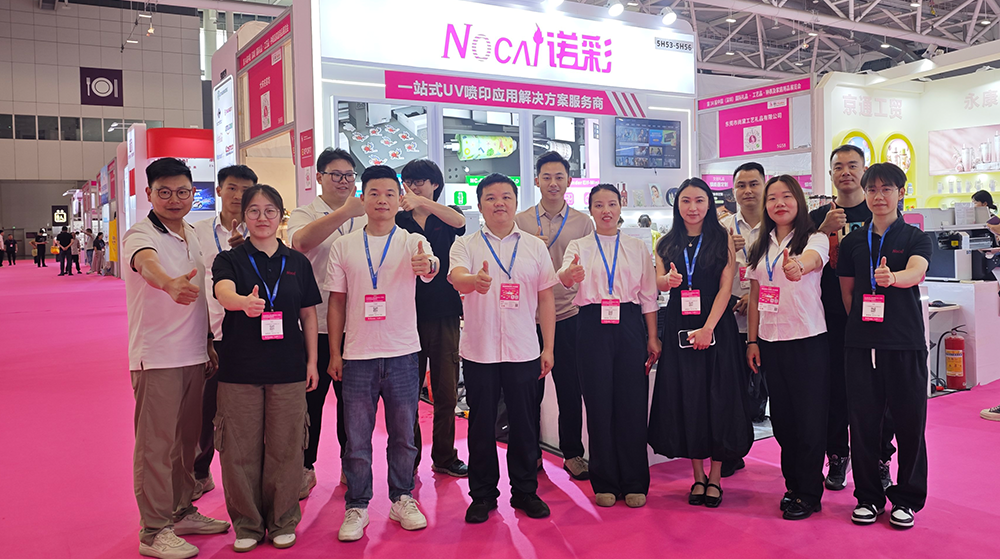
NOCAI’s Shenzhen Gift Fair Successfully Concluded. You Are Warmly Invited to Visit Our Factory for New Cooperation
2026-04-28
-

What Can a 6090 UV Flatbed Printer Produce? From Phone Cases to Metal Signs and Acrylic Artwork
2026-10-23 -
What to Do When a UV Flatbed Printer Printhead Clogs After Long-Term Inactivity?
2026-10-23 -
Full-Color Printing, Plate-Free Production, Multi-Material Compatibility — Three Core Advantages of UV Printers
2026-10-23 -
Key Factors Affecting the Actual Print Quality of Small UV Printers
2026-10-23 -

Figure out the differences between flatbed printers and cylindrical printers before purchasing a cosmetic printing machine
2026-10-10 -
Small UV Printer Buying Guide to Avoid Pitfalls: Printhead vs Curing System, Which Matters More?
2026-10-10 -
Which Industries Are Suitable for A3 UV Printers? What Value Can They Bring to New Entrepreneurs?
2026-09-21 -
How Critical Is Printhead Technology for UV Flatbed Printers? Professional Comparison Between Ricoh & Epson Printheads
2026-09-21 -

How to Troubleshoot Ink System Issues on a UV Flatbed Printer?
2026-09-17 -
Choosing a UV Printer for Gift Customization Is More Complex Than It Looks: Printheads and Ink Systems Make the Difference
2026-09-17
CONTACT US


Guangzhou Nuocai Digital Products Co., Ltd.
If you would like to keep touch with us directly, please go to contact us
-
![]()
Home
-
![]()
Tel
-
![]()
Email
-
![]()
Contact


