
UV Ink Expiration and Storage: How Expired Ink Can Damage Printheads
UV ink is the lifeblood of a UV flatbed printer. Its quality directly affects print results and printhead lifespan. Many users keep extra ink in stock, but UV ink does not last indefinitely. Understanding how expired ink can damage printheads and how to store ink properly can help prevent unnecessary equipment failures.
Physical Changes in Expired UV Ink
Fresh UV ink is designed to provide stable flow characteristics and reliable curing performance. As storage time increases, the chemical properties of the ink gradually change.
Solvents and monomers may slowly evaporate, causing the ink viscosity to increase and reducing its flowability. At the same time, pigment particles may begin to agglomerate and settle, forming larger clusters instead of remaining evenly dispersed.
As a result, the ink changes from a smooth, easily printable fluid into a thicker material containing unwanted particles.
How Expired Ink Damages Printheads
When expired ink enters the printhead, it can cause damage in several ways.
First, high-viscosity ink is more difficult to eject through microscopic nozzles. This can create abnormal pressure within the printhead and may eventually affect the performance of piezoelectric components.
Second, pigment agglomerates can directly block the nozzles. These blockages are often more difficult to remove than ordinary dried ink deposits, and aggressive cleaning attempts may increase the risk of printhead damage.
Third, some ink ingredients may degrade or separate over time. These altered substances can react with internal materials such as adhesives, seals, and O-rings, potentially leading to seal failure or component corrosion.
Proper Storage Practices
To maximize the usable life of UV ink, follow these storage guidelines.
Store ink in its original sealed container and avoid opening the bottle unnecessarily, as exposure to air and moisture can accelerate degradation.
Keep ink in a cool, dark environment with temperatures between 15°C and 30°C (59°F–86°F). Avoid direct sunlight and keep containers away from heat sources.
Once opened, UV ink is generally best used within six months. Unopened ink should also be used before its stated expiration date.
Usage Recommendations
Before adding ink to the printer, gently shake the bottle to help redistribute any settled pigments.
If the ink has passed its expiration date or shows signs of deterioration such as heavy sedimentation, layer separation, unusual odor, or abnormal consistency, it should not be used.
The cost of replacing a bottle of ink is typically far lower than the cost of replacing a damaged printhead.
Conclusion
The damage caused by expired UV ink is often gradual and irreversible. Proper storage, purchasing ink according to actual needs, and replacing expired ink on time are some of the most effective ways to protect your printheads and maintain reliable printing performance.
-

Thank You for Every Connection! Nuocai Wraps Up the Shenzhen Gifts & Home Fair Successfully — Visit Our Factory to Discover More
2026-10-23 -

Final Countdown! Day Three at the Shenzhen Gifts & Home Fair: Nuocai’s Last-Chance Show Specials Are Bigger Than Ever
2026-10-22 -

Day Two at the Shenzhen Gifts & Home Fair: Nuocai Keeps the Crowds Coming! Live Demos of 3D Figures, 2.5D Relief Crafts, Perfume Bottles, Tumblers, and UV DTF Stickers
2026-10-22 -

A Decade of Excellence: Nuocai Unveils Its Latest Innovations on Day One of the Shenzhen Gifts & Home Fair! Full-Color 3D Printing Steals the Show
2026-10-20 -

Nuocai Successfully Concludes PRINTING United Expo 2026 in Las Vegas
2026-09-28 -

Making an Impact in Las Vegas — Nuocai Makes a Strong Debut at PRINTING United Expo 2026
2026-09-24 -

Growing Together, Moving Forward with Purpose | Guangzhou Nuocai 2026 Production Trainee Representative Symposium
2026-08-29 -

A Truckload of Henan Melons, A Thousand-Mile Bond with Guangdong|Nocai’s Charitable Purchase: Supporting Farmers, Refreshing Our Team
2026-08-11 -

Topping-out Ceremony Successfully Held! NOCAI Digital’s Capital Increase & Capacity Expansion Project Officially Topped Out, Embarking on a New Journey of Smart Manufacturing
2026-04-28 -
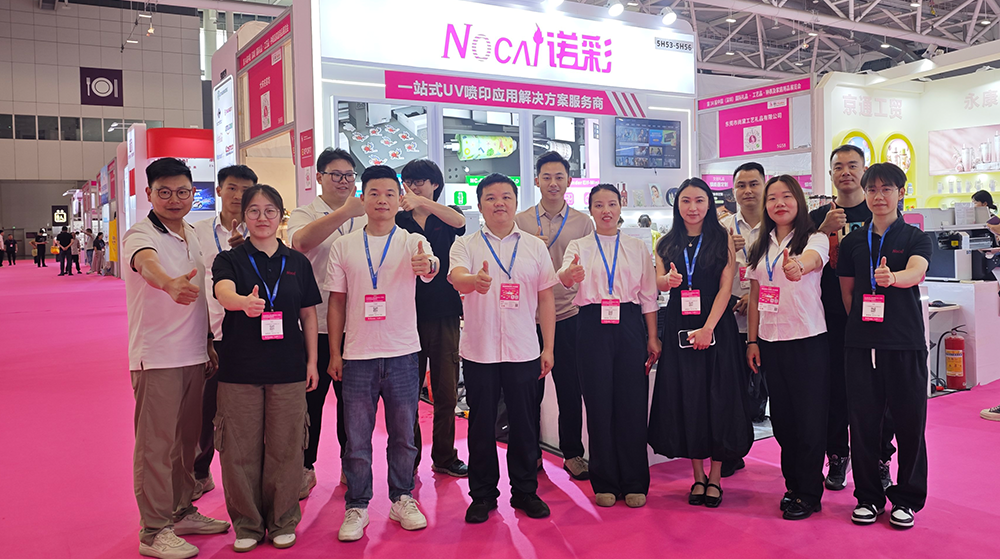
NOCAI’s Shenzhen Gift Fair Successfully Concluded. You Are Warmly Invited to Visit Our Factory for New Cooperation
2026-04-28
-

What Can a 6090 UV Flatbed Printer Produce? From Phone Cases to Metal Signs and Acrylic Artwork
2026-10-23 -
What to Do When a UV Flatbed Printer Printhead Clogs After Long-Term Inactivity?
2026-10-23 -
Full-Color Printing, Plate-Free Production, Multi-Material Compatibility — Three Core Advantages of UV Printers
2026-10-23 -
Key Factors Affecting the Actual Print Quality of Small UV Printers
2026-10-23 -
Figure out the differences between flatbed printers and cylindrical printers before purchasing a cosmetic printing machine
2026-10-10 -
Small UV Printer Buying Guide to Avoid Pitfalls: Printhead vs Curing System, Which Matters More?
2026-10-10 -
Which Industries Are Suitable for A3 UV Printers? What Value Can They Bring to New Entrepreneurs?
2026-09-21 -
How Critical Is Printhead Technology for UV Flatbed Printers? Professional Comparison Between Ricoh & Epson Printheads
2026-09-21 -

How to Troubleshoot Ink System Issues on a UV Flatbed Printer?
2026-09-17 -
Choosing a UV Printer for Gift Customization Is More Complex Than It Looks: Printheads and Ink Systems Make the Difference
2026-09-17
CONTACT US


Guangzhou Nuocai Digital Products Co., Ltd.
If you would like to keep touch with us directly, please go to contact us
-
![]()
Home
-
![]()
Tel
-
![]()
Email
-
![]()
Contact


